
HOW SHOWINGHQ WORKS
From Listing Interest to Confirmed Showing—All in One Connected Flow
Create your first booking page, share it anywhere, manage every showing request, and measure what's generating buyer opportunities.

STEP 1 — SET UP
Launch Your First Booking Page With Guided Setup
Every new ShowingHQ account begins with the Getting Started Wizard—a guided, step-by-step process that helps you create your and publish your first booking page quickly and correctly.

No complicated setup. No blank dashboard.
The wizard walks you through everything needed
to get your first booking page live.
GET STARTED
Give Every Prospect a
Clear Path to a Showing
Create branded Booking Pages, capture and organize leads,manage every showing request, and see what's driving results—all from one connected platform/

STEP 2 — SHARE
Turn Every Marketing Channel Into a Path to a Showing
Once your booking page is live, ShowingHQ automatically creates the links and QR codes you need to promote it across your marketing.

One booking page. Every marketing path connected.
With ShowingHQ you are always in control and in the know.
STEP 3 — REQUEST
Give Buyers a Clear Path to Request a Showing
Buyers open the branded booking page, see available dates and times, enter their information, and submit their request—without creation an account or waiting for someone to respond.

STEP 4 — RESPOND
Approve, Decline, or Propose Another Time
The assigned agent can open the Manage Showing directly from the New Showing Request Email or from the request inside your ShowingHQ Command Center. From there they can manage the showing without navigating through a complicated workflow.

GET STARTED
Give Every Prospect a
Clear Path to a Showing
Create branded Booking Pages, capture and organize leads,manage every showing request, and see what's driving results—all from one connected platform/
AFTER CONFIRMATION
Keeping Buyers in Control Without Creating More Work for the Agent
Once a showing is confirmed, the buyer receives everything needed to attend or manage the showing. If anything changes, the agent is automatically informed.

STEP 5 — MEASURE
See What's Working and Put Your Marketing Dollars Where They Matter
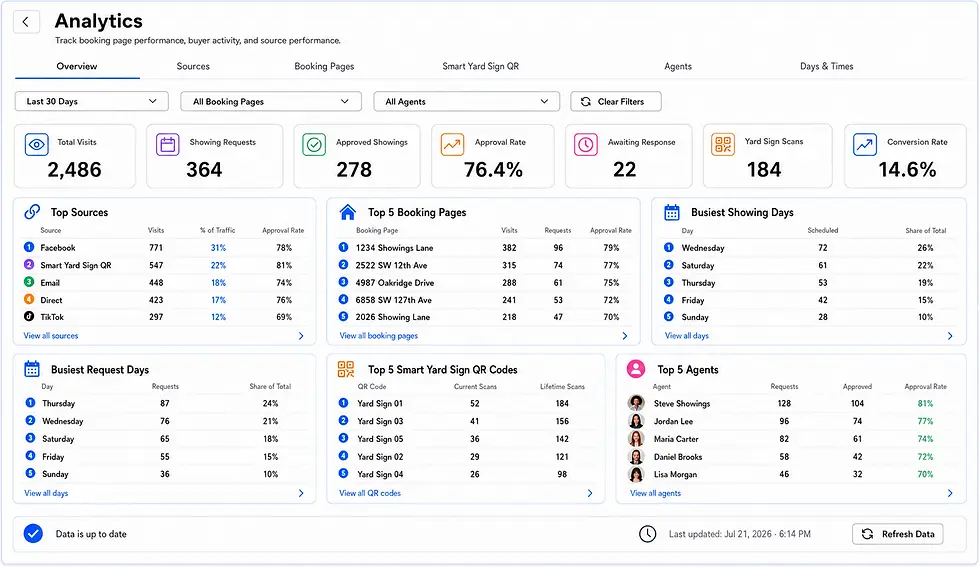
ShowingHQ Analytics connects buyer and showing activity to pages, sources, agents, days, and times generating it—helping agents make smarter marketing decisions.

Stop guessing where your leads are coming from. See it, compare it, act on it.
THE COMPLETE WORKFLOW
From Setup to Insight, ShowingHQ Keeps Everything Connected

GET STARTED
Give Every Prospect a
Clear Path to a Showing
Create branded Booking Pages, capture and organize leads,manage every showing request, and see what's driving results—all from one connected platform/


THE SHOWINGHQ PROCESS
One Simple Process. Every Step Connected.
From creating your first booking page to measuring buyer activity, ShowingHQ keeps the entire showing journey connected.

Set Up
Create and publish your first booking page with guided setup.

Share
Promote your page using links, social sharing, and smart QR codes.

Receive Requests
Let buyers choose an available date without creating an account.

Manage Showings
Approve, decline, propose another time while both sides stay informed.

Measure Results
See which pages, sources, agents, days, and times generate activity.
STEP 1 — SET UP
Launch Your First Booking Page With Guided Setup
Every new ShowingHQ account begins with the Getting Started Wizard—a guided, step-by-step process that helps you create your and publish your first booking page quickly and correctly.
Set Your Brand
Add your brokerage or team name, logo, time zone, and scheduling defaults.
Add Your First Agent
Create the agent profile buyers will see and connect it to the booking page.
Create Your Booking Page
Add the property, availability, listing details, and assigned agent.

No complicated setup. No blank dashboard.
The wizard walks you through everything needed to get your first booking page live.
STEP 2 — SHARE
Turn Every Marketing Channel Into a Path to a Showing
Once your booking page is live, ShowingHQ automatically creates the links and QR codes you need to promote it across your marketing.
17 Links, Auto-Generated
One direct link, 12 channel specific links, and four customizable trackable links.
Social Links, Ready to Share
Your social media marketing links are auto generated for every booking page.
QR Codes for Print Marketing
Custom and print links include QR codes for flyers, postcards, and more.
Reusable Smart Yard Sign QRs
Assign a QR to a property today, then assign it to another anytime. Eliminates the need to buy new signs for every listing.

One booking page. Every marketing path connected.
With ShowingHQ you are always in control and in the know.
STEP 3 — REQUEST
Give Buyers a Clear Path to Request a Showing
Buyers open the branded booking page, see available dates and times, enter their information, and submit their request—without creation an account or waiting for someone to respond.

GET STARTED
Give Buyers a Better Way to Request a Showing
Create your first branded booking page, set your availability, and start capturing showing requests and buyer leads.
STEP 4 — RESPOND
Approve, Decline, or Propose Another Time
The assigned agent can open the Manage Showing directly from the New Showing Request Email or from the request inside your ShowingHQ Command Center. From there they can manage the showing without navigating through a complicated workflow.

AFTER CONFIRMATION
Keeping Buyers in Control Without Creating More Work for the Agent
Once a showing is confirmed, the buyer receives everything needed to attend or manage the showing. If anything changes, the agent is automatically informed.
The confirmed email includes:
17 Links, Auto-Generated
Social Links, Ready to Share
QR Codes for Print Marketing
Reusable Smart Yard Sign QRs

Every Action Keeps All Side Informed
Whenever the buyer or agent takes action, ShowingHQ automatically notifies the other party.
STEP 5 — MEASURE
See What's Working and Put Your Marketing Dollars Where They Matter
ShowingHQ Analytics connects buyer and showing activity to pages, sources, agents, days, and times generating it—helping agents make smarter marketing decisions.
Filter, Compare, and Focus
Use filters throughout Analytics to narrow down results by date range, booking pages, source, agent, and other relevant criteria.
Overview
See account-wide activity and performance trends.
Sources
Identify which marketing channels generate visits, requests, and approvals.
Booking Pages
Compare booking-page traffic, showing requests, and approval rates.
Smart Yard Sign QR
Measure QR scans, assignments, requests, and conversion performanace.
Agents
Compare assigned requests, approvals, response times, and pending activity.
Days & Time
Understand when buyers request showings and when appointments are scheduled.
Stop guessing where your leads are coming from. See it, compare it, act on it.
THE COMPLETE WORKFLOW
From Setup to Insight, ShowingHQ Keeps Everything Connected

Guided Setup
Create and launch your first booking page.

Trackable Sharing
Share links and QR codes across marketing channels.

Automated notifications keep both side informed

Buyer Scheduling
Buyers have a simple and clear path to a showing.
.png)

Agent Decisions
Approve, decline, or propose a different time.

Self-Service
Confirmed buyers can cancel, or reschedule their showing.

Analytics
Measure pages, sources, agents, QR activity, and more.
GET STARTED
Turn More Listing Interest Into Real Opportunities
Give buyers a better way to request showings—and give agents one platform to capture leads, manage activity, measure performance, and strengthen seller confidence.
Set Up
Create and publish your first booking page with guided setup.
Share
Promote your page using links, social sharing, and smart QR codes.
Receive Requests
Let buyers choose an available date without creating an account.
Manage Showings
Approve, decline, propose another time while both sides stay informed.
Measure Results
See which pages, sources, agents, days, and times generate activity.
THE SHOWINGHQ PROCESS
One Simple Process.
Every Step Connected.
From creating your first booking page to measuring buyer activity, ShowingHQ keep the entire showing journey connected.