
SCHEDULER AND SO MUCH MORE
From Winning the Listing to Managing Every Showing—One Connected Platform
Create seller-ready Listing Presentations, launch branded Booking Pages, generate trackable marketing tools, capture and organize leads, manage showing requests, and measure what is driving activity—all from one connected platform.
.webp)
SCHEDULER AND SO MUCH MORE
From Winning the Listing to Managing Every Showing—One Connected Platform
Create seller-ready Listing Presentations, launch branded Booking Pages, generate trackable marketing tools, capture and organize leads, manage showing requests, and measure what is driving activity—all from one connected platform.


SIMPLE FROM THE START
Get Your First Booking Page Live in
Three Guided Steps
ShowingHQ guides you through the essential account, agent, and property information needed to launch your first Booking Page—without complicated setup.

WIN MORE LISTINGS
Walk Into Every Listing Appointment Ready to Win
Enter the basic property and seller information once, and ShowingHQ generates a polished, seller-ready Listing Presentation that explains your showing strategy and the value you bring to the listing.


Present It Your Way
Use Present Mode, take it anywhere with the offline browser version, or download it as a PDF.

Keep Presentations Organized
Track active presentations and mark each opportunity as Listing Won, Listing Lost, Archived, or still in progress.

Turn a Win Into a Live Booking Page
When you win the listing, carry the existing property information into a new Booking Page instead of entering everything again.

Generated for You
Create a polished presentation from basic listing information—without designing
slides.
GET STARTED
Give Every Prospect a
Clear Path to a Showing
Create branded Booking Pages, capture and organize leads,manage every showing request, and see what's driving results—all from one connected platform/
BRANDED BOOKING PAGES
Give Every Property Its Own Simple,
Branded Path to a Showing
Create mobile-friendly Booking Pages where prospects can view available dates and times, provide information, and submit a request directly to the assigned agent.


Real-Time Availability
Prospects only see the dates and times you make available using the booking page settings.

Simple Request Flow
Choose a date, pick a time, submit contact information, and submit. All notification are automated.

Branded Experience
Keep prospects requesting showings
inside a clear and consistent listing experience.

Branded Booking Pages
Show the property, your branding, and the assigned/listing agent in one polished experience.
MARKETING TOOLS
Turn Every Marketing Channel Into a Direct Path to a Showing
Share trackable links across social media posts and ads, email, text, websites, flyers, and more—so every prospect reaches the same Booking Page through one connected system.

SMART YARD SIGN QR
Create Once. Reassign From Listing to Listing.
Create a reusable Smart Yard Sign QR code once, create a sign rider, assign it to the active booking page, and reassign it when to a new listing is sold or leased. With our Smart Yard Sign QRs, you never have to spend on ordering new riders.

GET STARTED
Give Every Prospect a
Clear Path to a Showing
Create branded Booking Pages, capture and organize leads,manage every showing request, and see what's driving results—all from one connected platform/
DISCOVER MORE OPPORTUNITIES
Keep Prospects Exploring More of What Your Represent
Give prospects more than one property to explore. Show active Booking Pages in one public hub and surface additional opportunities directly from the booking experience.

SHOWING MANAGEMENT
Give Every Showing Request a Clear Next Step
Review requests, check property and prospect details, and approve, decline, or propose another time—directly from email notifications on your mobile phone or from your desktop dashboard.

LEAD MANAGEMENT
Keep Every Prospect and Conversation Organized
Capture prospects from your Booking Pages, add leads from calls, referrals, open houses, and other offline sources, and manage every record from one connected workspace.

GET STARTED
Give Every Prospect a
Clear Path to a Showing
Create branded Booking Pages, capture and organize leads,manage every showing request, and see what's driving results—all from one connected platform/
MARKETING ANALYTICS
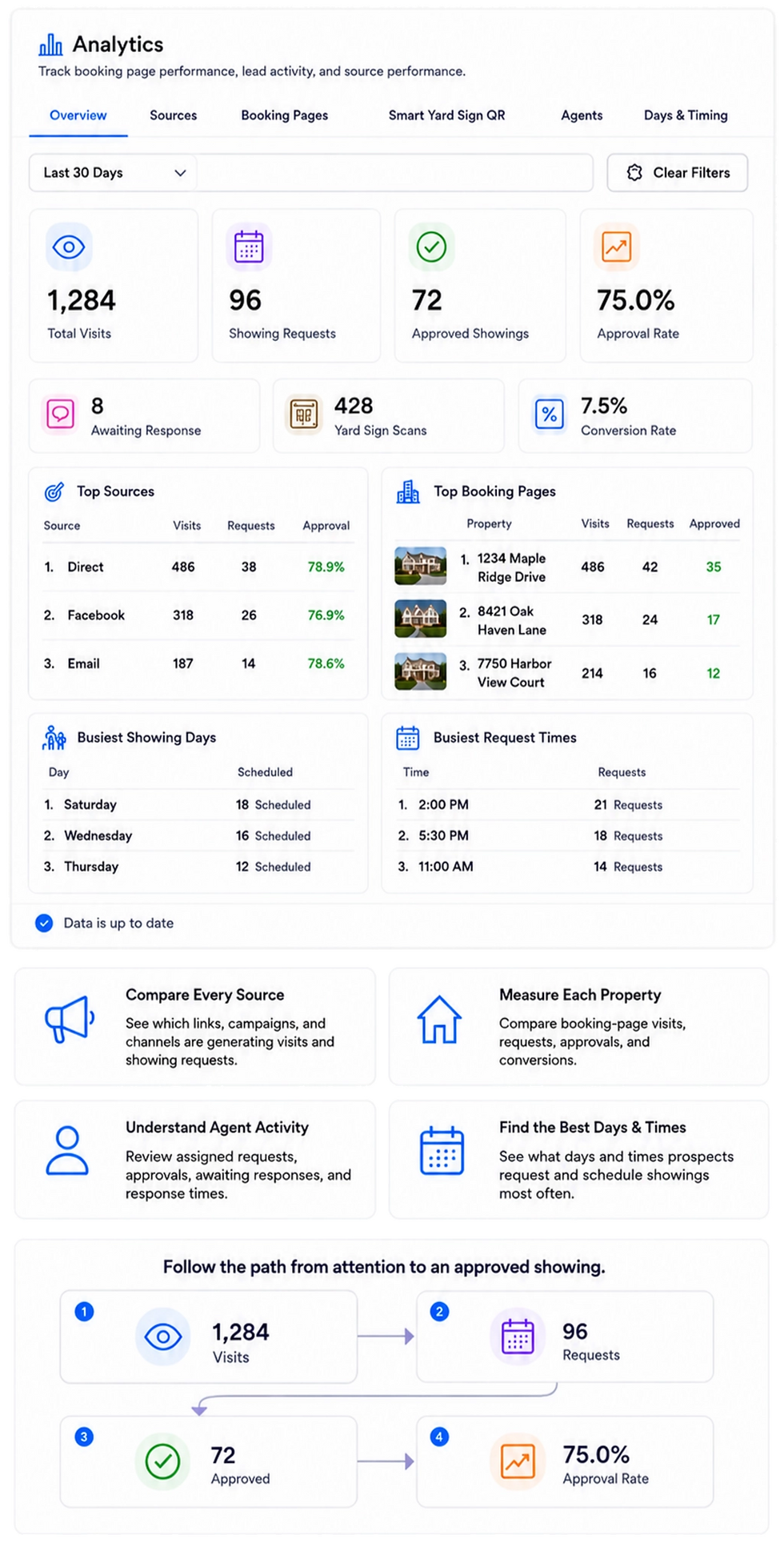
See What Is Driving Visits, Leads, and Showing Requests
Compare properties, marketing sources, Smart Yard Sign QR codes, agents, days, and times—then focus attention on what is producing activity.
COMMAND CENTER
Everything around the Showing, Organized in One Workspace
Bring booking pages, leads, showing requests, marketing tools, agents, analytics, and listing presentation together—so the next action is always clear.

AGENT & TEAM MANAGEMENT
Keep Every Agent, Seat, and Assignment Connected
Invite agents, manage seats, complete member profiles, assign Booking Pages, and control what each team member can access.

DOCS, GUIDES, & SUPPORT
Find Answers, Submit Tickets, and Follow Every Update
Start with the guided setup and help documentation. If you still need assistance submit a support ticket and follow its status and replies from one workplace.

SIMPLE FROM THE START
Get Your First Booking Page Live in
Three Guided Steps
ShowingHQ guides you through the essential account, agent, and property information needed to launch your first Booking Page—without complicated setup.
%20(1).webp)

No complicated setup. Just the information needed to get your first Booking Page working.
WIN MORE LISTINGS
Walk Into Every Listing Appointment Ready to Win
Enter the basic property and seller information once, and ShowingHQ generates a polished, seller-ready Listing Presentation that explains your showing strategy and the value you bring to the listing.
Generated for You
Create a polished presentation from basic listing information—without designing slides.
Present It Your Way
Use Present Mode, take it anywhere with the offline browser version, or download it as a PDF.
Keep Presentations Organized
Track active presentations and mark each opportunity as Listing Won, Listing Lost, Archived, or still in progress.
Turn a Win Into a Live Booking Page
When you win the listing, carry the existing property information into a new Booking Page instead of entering everything again.
.jpg)
.webp)
BRANDED BOOKING PAGES
Give Every Property Its Own Simple,
Branded Path to a Showing
Create mobile-friendly Booking Pages where prospects can view available dates and times, provide information, and submit a request directly to the assigned agent.
Branded Experience
Keep prospects requesting showings inside a clear and consistent listing experience.
Simple Request Flow
Choose a date, pick a time, submit contact information, and submit.
Real-Time Availability
Prospects only see the dates and times you make available.
Branded Booking Pages
Show the property, your branding, and the assigned/listing agent in one polished experience.
.webp)
.webp)
.webp)
.webp)
MARKETING TOOLS
Turn Every Marketing Channel Into a Direct Path to a Showing
Share trackable links across social media posts and ads, email, text, websites, flyers, and more—so every prospect reaches the same Booking Page through one connected system.
SMART YARD SIGN QR
Create Once. Reassign From Listing to Listing.
Create a reusable Smart Yard Sign QR code once, create a sign rider, assign it to the active booking page, and reassign it when to a new listing is sold or leased. With our Smart Yard Sign QRs, you never have to spend on ordering new riders.

1. Create Once
One reusable Smart Yard Sign QR code asset.

3. Track Activity
Visits and requests still flow into Marketing Analytics.

2. Assign to a Listing
Connect it to the active listing/booking page.

4. Reassign Anytime
Switch the QR destination when the property changes.
.webp)
%20(1).webp)
DISCOVER MORE OPPORTUNITIES
Keep Prospects Exploring More of What You Represent
Give prospects more than one property to explore. Show active Booking Pages in one public hub and surface additional opportunities directly from the booking experience.
%20(1).png)
Help one property lead to the next opportunity
SHOWING MANAGEMENT
Give Every Showing Request a Clear Next Step
Review requests, check property and prospect details, and approve, decline, or propose another time—directly from email notifications on your mobile phone or from your desktop dashboard.
Organized Inbox
See new requests, upcoming showings, waitlist, history, and archived—all in one place.
Flexible Responses
Approve, decline, or propose another time to find the best fit for everyone.
Prospect Context
See the property, prospect details, notes, and activity with each request.
Automated Updates
Keep agents and prospects informed with instant updates via email notification.
.webp)
From request to next step—without the back-and-forth.
.webp)

One lead workspce. Every source, detail, and next step.
LEAD MANAGEMENT
Keep Every Prospect and Conversation Organized
Capture prospects from your Booking Pages, add leads from calls, referrals, open houses, and other offline sources, and manage every record from one connected workspace.

Automatic Lead Capture
Turn Booking Page activity and showing requests into organized prospect records.

Add Leads From Any Source
Manually add prospects and record where each opportunity originated.

A Clear Follow-Up Picture
Review contact details, notes, status, consent, assigned agent, and showing activity together.
MARKETING ANALYTICS
See What Is Driving Visits, Leads, and Showing Requests
Compare properties, marketing sources, Smart Yard Sign QR codes, agents, days, and times—then focus attention on what is producing activity.

Compare Every Source
See which links, campaigns, and channels are generating visits and showing requests.

Understand Agent Activity
Review assigned requests, approvals, awaiting responses, and response times.

Measure Each Property
Compare booking-page visits, requests, approvals, and conversions.

Find the Best Days & Times
See what days and times prospects request and schedule showings most often
.webp)
.webp)
COMMAND CENTER
Everything around the Showing, Organized in One Workspace
Bring booking pages, leads, showing requests, marketing tools, agents, analytics, and listing presentation together—so the next action is always clear.

See What Needs Attaention
Open the right area and quickly find the work that needs attention.

Share Every Listing
Use one Agent Listing Hub link or QR code to promote all active and coming-soon booking pages.

Keep Everything Connected
Move between booking pages, leads, showings, marketing, analytics, and agents.

Stay Organized as You Grow
Keep properties, leads, agents, settings, and account tools in one central workspace.

.webp)
AGENT & TEAM MANAGEMENT
Keep Every Agent, Seat, and Assignment Connected
Invite agents, manage seats, complete member profiles, assign Booking Pages, and control what each team member can access.

Keep Profiles Complete
Manage agent names, titles, photos, contact information, and account status.

Connect Every Assignment
Keep each property and showing request connected to the assigned agent.

Keep Profiles Complete
Manage agent names, titles, photos, contact information, and account status.

Manage Seats and Access
See active agents, available seats, roles, and pending invitations in one place.
.webp)
.webp)
DOCS, GUIDES, & SUPPORT
Find Answers, Submit Tickets, and Follow Every Update
Start with the guided setup and help documentation. If you still need assistance submit a support ticket and follow its status and replies from one workplace.

Start with Guided Set Up
Use the Getting Started Wizard to get your first booking page published and live.
.png)
Submit and Track Tickets
Create a support ticket and review its status. Notification is sent when support replies.
Find Step-by-Step Help
Open guides, setup tips, and feature documentation and videos whenever you need them.

Follow the Conversation
Follow the ticket details and conversation thread in one organized workplace.
.webp)
.webp)

LISTING INTEREST IS TOO VALUBLE
TO LOSE
Turn Every Listing Into
More Showings, More Leads, and More Business
ShowingHQ replaces missed calls, scattered messages, untracked marketing, and disconnected showing workflows with branded booking pages, smart QR codes, automated showing management, organized leads, analytics, and seller-ready presentations.
.png)
Smart Yard Sign QR Codes
Agent-branded booking pages
Analytics & Performance
Lead Management & Follow-Up
One platform. The entire showing journey.
.png)
Capture interest
Automatically turn clicks, scans, signs, ads, and more into identifiable buyer leads.
.png)
Schedule showings
Let buyer request from available dates and times without the phone tag.
.png)
Manage every request
Approve, decline, propose another time, reschedule, or cancel with a simple click.

Measure performance
See which channels generate leads and showings, so you can spend smarter.
THE PROBLEM
Listing Interest Shouldn't Get Lost Before the Showing
No more phone tag, email tag, or unnecessary back-and-forth. ShowingHQ gives buyers a direct way to request available showing times while agents capture the lead, track the source, and stay in control of every request.
Request in minutes
See Real Availability
Capture every lead


Give Every Property Its Own Buyer-Ready Showing Page
Create a professional, agent-branded page for every property. Buyers can review the home, see available dates and times, provide their infomation, answer the buyer brokerage agreement question, and request a showing in minutes.
You set the availability. You control the approval. ShowingHQ manages everything in between.

Branded Booking Pages
Professional pages that build trust and showcase your listings.
Real-Time Availability
Buyers only see the date and times that are actually available.
Coming-Soon Waitlists
Capture interested buyers before showings are available.
Automatic Confirmations
ShowingHQ handles all the confirmations and showing notifications automatically.
Plus, buyer agreement compliance and agent-controlled approvals.
GET STARTED
Give Every Prospect a
Clear Path to a Showing
Create branded Booking Pages, capture and organize leads,manage every showing request, and see what's driving results—all from one connected platform/